4Geeks AI Studio
4Geeks AI Studio delivers software through pods: a human 4Geeks pod lead plus a small team of AI agents working on your repository. You describe the outcome, approve the plan and review the merge request. The pod handles the planning, the code, the tests and the evidence.
It is not a chatbot and it is not a tool you have to prompt. It is a delivery service with a monthly plan, a prepaid wallet and a human who owns the result.
In summary
For: founders, product teams and engineering leads with a repository and a clear outcome.
Time: 5 minutes to read; the first plan usually arrives the same day.
Result: a pod working on your repo, with a plan you approve and a merge request you review.
What AI Studio delivers
A pod takes one outcome — a feature, a bugfix, a documentation set, an audit, a QA pass, a dependency upgrade or a database migration — and turns it into a plan, tasks, code, tests and a merge request ready for your team to review.
- One accountable human. Every pod has a 4Geeks pod lead who reviews the scope, answers questions and escalates when work is stuck.
- One unit of work and billing. The pod owns its plan, tasks, repository, tools, wallet and timeline.
- Honest progress. Progress is weighted by completed tasks and capped by phase. It is never a timer.
- Evidence, not promises. A pod cannot be marked delivered without a green build and test run when the quality gate is on.
- Your repository stays yours. The pod works on a branch and opens a merge request. It never pushes to your protected branch.
How it works
flowchart LR
    A[Choose an outcome] --> B[Answer a short intake]
    B --> C[Pod lead reviews the scope]
    C --> D[You approve the plan]
    D --> E[The pod builds and tests]
E --> F[You review the merge request]- Choose an outcome. Pick what you need in business language: launch the first slice of a product, add a feature, fix a bug, audit the code, migrate a database, document the system, improve tests or upgrade dependencies.
- Answer a short intake. Five questions in your own words. No prompt engineering and no technical specification required.
- Approve the plan. The pod lead turns the answers into a plan with tasks, acceptance criteria, assumptions, risks and what is out of scope.
- Follow the build. The pod works in a sandbox on your repository. When it needs a decision, it appears in We need you.
- Review the merge request. The pod opens a branch and an MR with tests. Your team reviews and merges; the pod does not deploy to production.
Visual guide
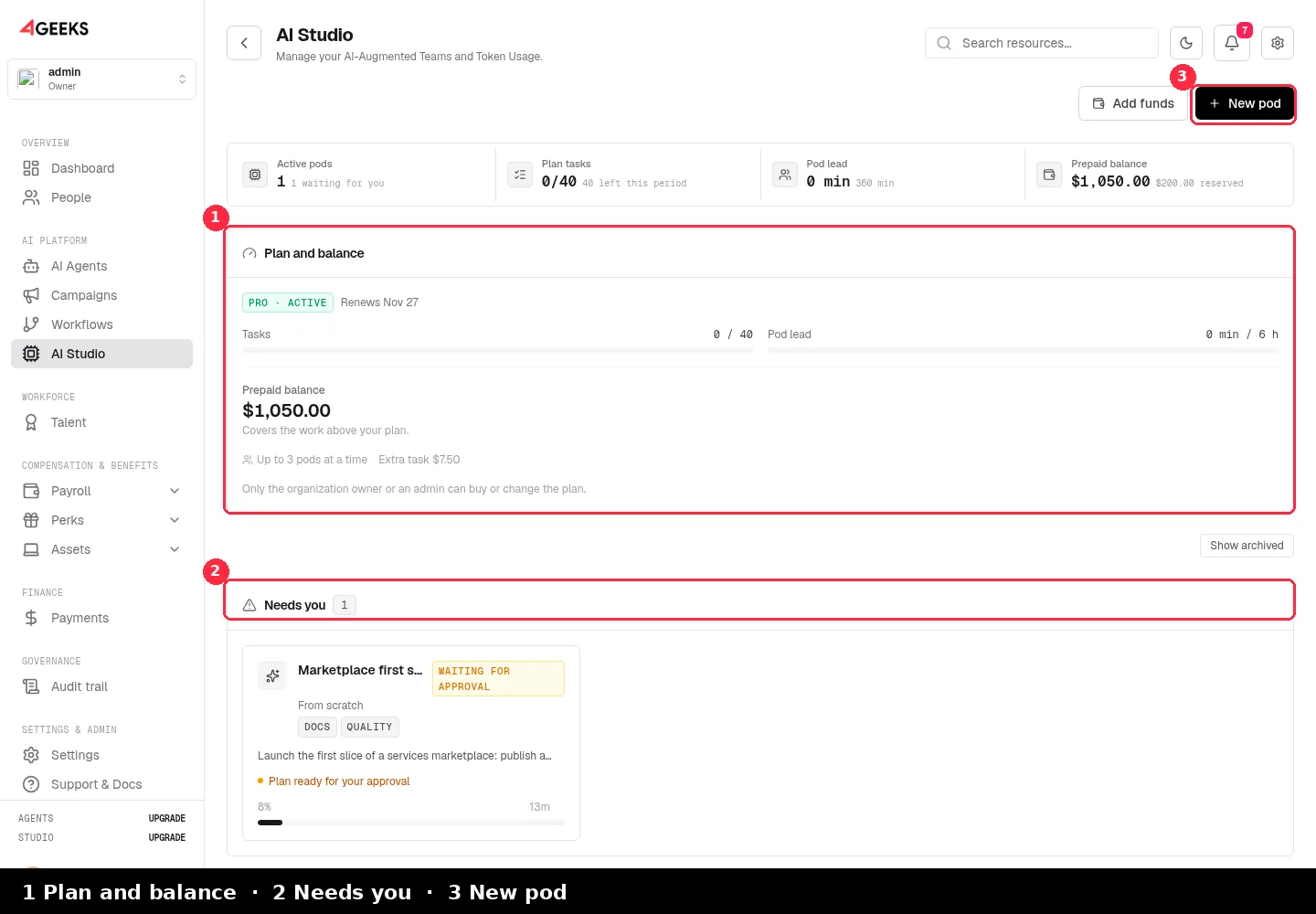
Your pod list, plan and balance
The home screen is ordered by what you can act on: Needs you, In progress and Finished. The Plan and balance card shows the monthly allowance, the prepaid balance and the concurrency limit. New pod starts the wizard.
Plans and pricing
The plan is the base: every billing period it includes a bag of tasks and pod lead hours. Work above the bag is paid from the prepaid wallet, never as a surprise invoice. Tokens are tracked for cost and support but are not a customer quota.
| Plan | Monthly base | Tasks / month | Pod lead / month | Pods at once | Extra task |
|---|---|---|---|---|---|
| Lite | $390 | 10 | On demand ($75/h) | 1 | $9 |
| Starter | $790 | 15 | 2 h | 1 | $9 |
| Pro | $1,590 | 40 | 6 h | 3 | $7.50 |
- Only delivered work is billable. A failed attempt and one retry are absorbed by 4Geeks.
- The bag resets every period. Usage is counted inside the current billing period; nothing accumulates.
- You can cap the spend. A pod pauses and asks for a top-up before it exceeds its budget.
- Plans are self-serve. The organization owner or an admin can buy or change a plan from AI Studio; changes are prorated.
See how usage, plans and the wallet work
What a pod can deliver
The wizard turns an outcome into a playbook: the team, capabilities, task kinds and expected deliverables.
See each use case with its process, results and deliverables
| Outcome | Playbook | What you receive |
|---|---|---|
| First slice of a product | greenfield | A working flow, a small operations panel, tests and the code in your repo |
| Add a feature | feature | The feature working, tests and a merge request ready to review |
| Find and fix a bug | bugfix | The cause explained, a failing test that proves it and the fix |
| Audit the code | audit | A prioritised report of risks and technical debt; no changes to your code |
| Migrate a database | db-migration | Schema map, reviewed DDL, a shadow validation and a runbook |
| Document the system | docs | Documentation written from the real code and published where you need it |
| Improve quality and tests | qa | Reproduced failures, wider coverage and a green browser run when E2E is on |
| Upgrade dependencies | upgrade | The upgrade applied, breakage fixed and a merge request with a changelog |
Capabilities
A capability is not a label: it turns on the skills, toolchains, task kinds and artifacts the pod can actually produce. The plan is validated against them.
| Capability | What it turns on | Typical use |
|---|---|---|
| Docs | Documentation tasks and a document artifact | READMEs, ADRs, API references |
| SCRUM | Story writing and issue sets | Backlog grooming for Jira, Confluence or Notion |
| Data | Schema introspection, migration and shadow validation | SQL Server → PostgreSQL or MySQL projects |
| Quality | QA (build, tests and browser checks) plus Review (the merge request you approve) | Every feature, bugfix and upgrade |
| E2E | Playwright and Chromium; browser test gate | Critical flows such as checkout or signup |
| Security | Security review and investigation | Audits and pre-investment due diligence |
| Design | Design intake and screenshots | Translating a mockup or brief into UI work |
| Preview | A temporary preview URL | Visual review before merging (rollout-dependent) |
You choose capabilities when you create the pod. After the plan is approved they are locked, because the plan, the image and the tasks depend on them.
The pod lead
The pod lead is a 4Geeks engineer, not an AI agent. They review the scope before you approve it, answer questions in the pod room, unblock the pod when it stalls and decide when a delivery is ready for review.
- Included hours: Starter includes 2 h/month and Pro includes 6 h/month. Lite works on demand.
- On demand: extra pod lead time is billed at $75/h from the wallet.
- SLA: each pod shows its target response time in business hours.
- Ask for help: if you are not sure what you need, choose I am not sure, I want help in the wizard. A pod lead reads your answers and contacts you.
A request for help needs an active plan, pod lead minutes left in the period and a card on file. A program (XL) is different: it is pre-sales, so any active member can ask for a quote and a pod lead prepares phase 1 before you approve anything.
Pod or program?
The wizard estimates the size of the brief and explains the path. The size is never asked; it is derived from what the outcome needs.
| Size | What happens |
|---|---|
| S | One small delivery, such as a bugfix or a single feature, with a short plan. |
| M | One complete flow with several tasks, such as a checkout or a booking flow. |
| L | A product-sized brief delivered in phases. The pod delivers one declared slice; the remaining phases stay visible in the plan. |
| XL | A program, not a pod. A pod lead prepares phase 1 with you, you approve it and only then the first pod is created. |
Security and control
- Repository access is scoped. Credentials live in the vault and are used only by the pod’s sandbox. A pod works on a branch and opens an MR; it never pushes to a protected branch.
- The sandbox is isolated. Each pod runs in its own environment with the runtime image its stack needs.
- 4Geeks is the brand you see. Model routing is an implementation detail: the console and the timeline show 4Geeks Fast/Strong, never a provider name.
- The audit trail is exportable. The pod timeline records tasks, checks, approvals and messages, with credentials redacted.
- The quality gate is enforced server-side. Build, tests and browser E2E are checked before delivery; a waiver needs a written reason and is audited.
Best practices
- Describe the outcome, not the steps. “Customers can pay with a saved card” is better than “add a table and an endpoint”.
- Pick one outcome per pod. Product-sized work belongs in a phased L pod or a program.
- Connect the repository your team actually uses. The branch and the merge request are the delivery.
- Write acceptance criteria in the intake. The clearer “done” is, the fewer rounds the plan needs.
- Approve the plan before the build starts. The plan is the contract; changing scope after approval costs a new task.
- Answer “We need you” quickly. The pod pauses at a decision, not in the background.
- Use the pod lead. They are included for a reason: scope, risk and blocked work are their job.
- Review the MR, not the transcript. The merge request is the deliverable; the timeline is the evidence.
Frequently asked questions
Do I need to know how to prompt an AI?
No. The wizard asks five business questions. The pod lead and the planner turn them into a plan. You never write a prompt.
Does the pod deploy to production?
No. It works on a branch and opens a merge request. Your team reviews and merges. Deployment stays in your pipeline.
What happens if the work is bigger than one pod?
The wizard detects it. An L brief is delivered as one declared slice with later phases visible; an XL brief becomes a program with a pod lead and a phase 1 you approve first.
Can I change my plan?
Yes. The organization owner or an admin can change the plan from AI Studio. The change is prorated and there is never a second subscription.
Next steps
- See the AI Studio use cases
- Create a pod step by step
- Understand usage, plans and the wallet
- Read the Private AI Gateway
- Browse the AI Studio FAQ
Still have questions? Ask on Discord or explore the tutorials.